

Table of Contents
- Why Dog Tag Details Drift Out of Date
- What to Put on Dog Tags (and What to Leave Off)
- Dog Tag Engraving Requirements: What Councils Expect
- How to Update Dog Tag Details: Step-by-Step
- How to Keep Dog Tags Legible Year After Year
- Troubleshooting Common Update Errors and Privacy Risks
- Frequently Asked Questions
Last Updated: September 17, 2026
Why Dog Tag Details Drift Out of Date
Dog tag details go stale faster than most owners expect. A new mobile number, a house move, or a desexing can leave your pet's tag telling a stranger the wrong story. At Pet ID Tags Australia, we've spent over 20 years engraving tags, and the pattern repeats: the collar tag is the last thing anyone updates.
Your dog's identification lives in three places.
- The physical tag on the collar, which a finder reads first
- The microchip registry, which a vet or council scans
- The council registration, which holds your pet's legal record
Change your phone number and only one updates; the other two keep the old details until you fix them.
That gap is where lost pets stay lost.
What to Put on Dog Tags (and What to Leave Off)
The best dog tags carry two things: your mobile number and your dog's name. Everything else wastes space or creates a privacy risk. A finder needs to reach you fast, not read your street address, email, or dog's medical history.
Put these on the tag:
- Your mobile number (the one you actually answer)
- Your dog's name
- A second contact number, if you have one
Leave these off:
- Your full home address
- Your dog's microchip number
- Medical details or medication names
Dog Tag Engraving Requirements: What Councils Expect
Councils set the rules for pet registration, not tag engraving itself. Most require your dog to wear a tag showing identification and issue their own registration tag alongside it; check your local authority's website for the exact wording. What councils do control is your registration record, contact information, microchip number, and desexing status, and keeping it current is a statutory requirement in most jurisdictions.
| Tag Type | Who Issues It | What It Shows | How to Update |
|---|---|---|---|
| Council registration tag | Local government authority | Registration number, council details | Through your council account |
| Personal ID tag | You, or a tag supplier | Your phone number, dog's name | Order a replacement or edit a smart tag |
| Microchip record | Registry (via vet or council) | Chip number, owner details | Through the registry portal |
What the Rules Actually Require
Companion animal legislation is state and territory based, but three things are consistent:
Smart Pet ID Tag - QR Code Dog & Cat →

- Registration is mandatory for dogs over a set age (commonly six months, though some councils register from three months).
- A tag must be worn while the dog is in a public place. In most states this means the council-issued registration tag, not your personal tag.
- Microchipping is mandatory and the chip number must be linked to your registration record.
A few practical points that catch owners out:
- The council tag is not a substitute for a personal ID tag. With only a council tag, a finder must ring the council during business hours; a personal tag with your mobile number lets them call you immediately.
- Replacement council tags usually cost a fee. Lost or damaged registration tags are replaced for a fee, while your personal tag is yours to replace whenever you like.
- Registration must be renewed. Most councils run annual or lifetime registration, and if you move councils you generally need to re-register with the new authority, not just update your address.
Engraving Standards for Personal Tags
There is no legislated standard for personal ID tag engraving, so quality is up to you and your supplier. Two factors matter:
- Depth of engraving. Shallow stamped or printed text wears away within months. Deep laser engraving cuts into the metal so the characters survive scratching, rubbing and weather.
- Material. Stainless steel holds engraving well and resists corrosion. Cheaper alloys pit and blur the text faster.
How to Update Dog Tag Details: Step-by-Step
Updating dog tag details takes about 10 minutes if you know where to look. The trick is updating all three records, not just the tag itself.
Step 1: Log In to Your Council or Registry Portal
Start with your council's online portal, where most authorities let you view and amend your pet's registration.
You'll need:
- Your registration certificate or pet identification number
- A verification code, often sent by email or SMS
- Your account login details
Step 2: Amend Contact, Address and Microchip Details
Once you're in, work through every field.
- Contact information: update your mobile and email
- Change of address: enter your new details and the date you moved
- Microchip number: confirm it matches your pet's chip
- Desexing status: update this if your dog has been desexed since registration
- Pet status: notify the council if your pet has passed away
Submit the form and save the confirmation. Some councils post a new certificate; others update your digital account straight away.
Step 3: Update Your Smart Tag Profile or Order a Replacement Tag
Now the tag on the collar, where most people waste money. If you use a smart tag with a QR code, you don't need a new tag: log in, edit your pet's digital profile, and the change goes live the moment you save it.
How to Keep Dog Tags Legible Year After Year
Deep engraving is the single biggest factor in tag longevity. Shallow stamped text wears away in months, while deep laser engraving cuts into the metal so letters stay readable after years of wear.
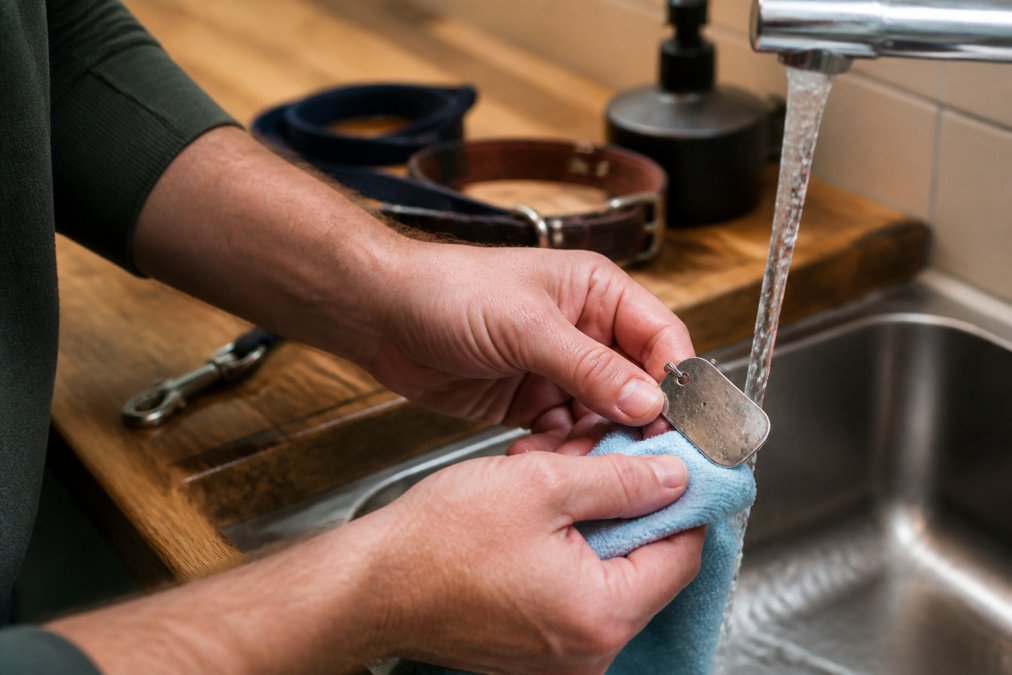
A few habits keep tags readable:
Smart Pet ID Tag - QR Code Dog & Cat →
- Wipe the tag with a soft cloth every few weeks
- Rinse off mud and salt water after beach trips
- Check the engraving every month for fading or wear
- Replace the tag the moment the text stops being clear
The Physical Tag vs. the Digital Record: What Most Guides Miss
Here's the gap that trips up almost every owner: when your contact details change, you're updating two systems that fail in different ways.
How to Decide Which Tag Type Suits You
Ask yourself three questions:
- How often do your contact details change? If you've changed your mobile number in the last two years, a smart tag will save you money over time.
- Do you want a finder to see more than a phone number? A QR profile can show your dog's name, your contact details, and instructions like 'call my vet' or 'I'm nervous, approach slowly'. An engraved tag shows only what fits on the metal.
- Do you want the tag to work without a phone? An engraved tag is readable instantly by anyone; a QR tag requires a smartphone and a scan.
Many owners run both: an engraved tag with the mobile number for instant readability, plus a smart tag or registry record for the fuller profile, covering the finder who just wants to call and the one who wants more context.
When to Replace Rather Than Clean
Cleaning buys time but can't restore worn engraving. Replace the tag when:
- The text is no longer readable from arm's length
- The metal has pitted or corroded around the characters
- The attachment hole has worn thin and the tag is at risk of falling off
- Your contact details have changed and the tag can't be edited
Troubleshooting Common Update Errors and Privacy Risks
Most update errors come down to one of four problems.
Frequently Asked Questions
Do I need to buy a new tag every time my phone number changes?
Not necessarily. If you use an engraved tag, a changed number does mean ordering a replacement, since the metal itself carries the details. A smart tag with a QR code works differently: you create a digital profile and update your contact information online whenever it changes, so the physical tag stays on the collar. This avoids repeated purchases and keeps your dog's identification current from the moment you edit your profile.
What should I put on my dog's ID tag, and what should I leave off?
Include your dog's name and at least one reachable phone number. If there is room, a second contact number helps when you are unreachable. Leave off your full street address, your dog's microchip number and any medical details, since these are visible to anyone who picks up the tag. A smart tag lets you store extra information in a digital profile that only appears after a scan.
How do I update my dog's microchip and council registration details?
Microchip details are held on a national pet registry, while council registration sits with your local government authority. Log in to the relevant online portal, or contact the registry or council directly if you do not have digital account access. Amend your contact information, change of address and desexing status as needed, then submit the form and keep the confirmation. Both records should be updated whenever your details change.
How often should I check my dog's tag for wear and tear?
Check the tag monthly and after any swim or muddy walk. Look for faded engraving, a worn split ring or a loose clip, since a tag that falls off is no protection at all. Deep laser engraving holds up far better than surface printing, which can rub away within months. If the text is hard to read in normal light, replace the tag or move to a smart tag you can update online.